dbt with Apache Spark
dbt with Apache Spark
1. What is this about
In my previous work, I utilized a mix of the Scala Dataset API and Spark SQL for classification of transactions. While Datasets provide an excellent way to model data and its transformations in a type-safe manner, inexperienced teams often end up with a messy combination of Datasets and Spark SQL. As the project evolved, some parts began to reinvent their own version of dbt — a peculiar mix of HOCON and Jinja templating, where configs from Jinja were materialized during deployment and HOCON was used directly by Spark jobs.
While Scala brings much-desired type safety, it introduces a significant challenge: the analytics team is often unable (or unwilling) to read it. When transformations aren't complex enough, it is possible to end up with a dual specification: one living on the prototyping/analytics side, defined in SQL, and another based on Scala or Spark SQL embedded in Scala code. Additionally, the code solution can suffer from common ETL pitfalls such as lack of lineage, incoherent documentation, and mixing tools that serve similar purposes - or focusing on reinventing the wheel instead of solving real business problems.
The project demonstrates how to transform raw transaction data into a tagged and pivoted format, making it easier to analyze transaction patterns. The project explores how dbt can work with Spark and how to configure it effectively.
Key Goals:
- Data Ingestion: Load raw transaction and tag mapping data.
- Data Transformation: Join transactions with their corresponding tags.
- Pivoting: Transform the tagged data into a wide format where each tag becomes a boolean column, indicating its presence for each transaction.
- Data Quality: Implement dbt tests to ensure data integrity and accuracy throughout the transformation process.
The core transformation involves:
- Reading raw transaction data (likely containing transaction IDs, amounts, timestamps, etc.).
- Reading tag mapping data (linking transaction IDs or types to specific tags like 'FoodPurchase', 'RetailPurchase', 'SpecialTransaction').
- Joining these datasets to create a unified view of transactions with their associated tags.
- Pivoting this unified view so that each unique tag becomes a column. The values in these columns are boolean, indicating whether a specific transaction has that tag.
- Ensuring the final pivoted table has one row per unique transaction ID.
2. How to Set Up the Project
Setting up this project involves cloning the repository, installing dependencies, and configuring dbt profile.
Prerequisites:
- Python 3.x installed
pip(Python package installer)- Git installed
- Java 11 or 17 and Spark 3 Setup Steps:
Clone the Repository:
git clone https://github.com/0xpugsley/dbt_spark_transactions
cd dbt_spark_transactions
Set up a Python Virtual Environment (Recommended):
python3 -m venv venv
source venv/bin/activate  # On Windows use `venv\Scripts\activate`
Install dbt and Adapters: Install the core dbt library and the specific adapter for data platform (e.g.,
dbt-spark).pip install -r requirements.txt
Install dbt Packages: This project uses
dbt_utils. Install it by running:dbt deps
3. How to Test and Run It
Once set up, dbt models can be run and tested.
Start thrift server: This command starts thrift server, spark should be installed and
SPARK_HOMEenvironment variable set up.$SPARK_HOME/sbin/start-thriftserver.sh \ --master local[*] \ --driver-memory 1g \ --executor-memory 1g
Seed Data (If applicable): If the project uses dbt seeds for initial data loading (e.g., the tag mapping), run:
dbt seedRun the dbt Models: This command executes all models in the project, transforming the data from source to the final pivoted table (
final_tagged_transactions_pivot).dbt runRun the dbt Tests: This command executes all defined tests (schema tests and custom data tests) to verify data quality.
dbt test
The output indicates whether each test passed or failed. All tests should pass if the setup and transformations are correct.
Typical Workflow:
dbt deps   # Install dependencies (run once initially)
dbt seed   # Load seed data (if used)
dbt run    # Execute transformations
dbt test   # Verify data quality
4. Lineage Graph
The lineage graph below illustrates the flow of data through the dbt models in this project. Each node represents a model or a seed, and the arrows indicate dependencies - showing how raw data is incrementally transformed into the final analytical tables. At the end dbt tests are visible.
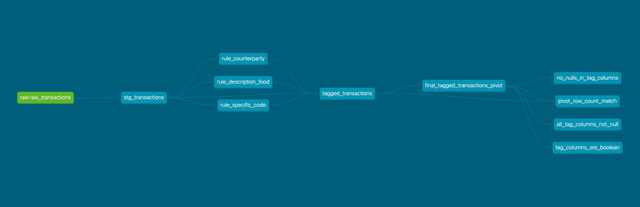
It can be generated by running:
dbt docs generate
dbt docs serve
and then opened in a browser.
5. Example transformations
- Transaction rule which will extract the tag
{{ config(materialized="ephemeral") }}

select txn_id, 'FoodPurchase' as tag, 1 as tag_id
from {{ ref("stg_transactions") }}
where regexp_like(lower(description), '\\b(banana|apple|grocery)\\b')
The configuration {{ config(materialized="ephemeral") }} defines the model's materialization strategy. By designating it as ephemeral, dbt ensures that the output exists only temporarily as an intermediate step in the processing workflow. This approach is particularly valuable for managing resources efficiently, avoiding the creation of persistent tables when the results are only needed for downstream dependencies.
The SQL query selects data from the stg_transactions model—referenced using {{ ref("stg_transactions") }} to maintain dbt's dependency management—and produces three columns: txn_id, a static tag labeled FoodPurchase, and a tag_id set to 1. The filtering logic uses a regular expression to target specific keywords (banana, apple, or grocery) within the description field, with the lower() function ensuring case-insensitive matching. The use of word boundaries (\\b) prevents partial matches (e.g., "pineapple" being mistaken for "apple").
- Merging datasets to obtain one enriched table
{{ config(materialized="table") }}

with
    all_tags as (
        select *
        from {{ ref("rule_description_food") }}
        union all
        select *
        from {{ ref("rule_specific_code") }}
        union all
        select *
        from {{ ref("rule_counterparty") }}
    )

select t.*, at.tag, at.tag_id
from {{ ref("stg_transactions") }} t
left join all_tags at on t.txn_id = at.txn_id
where at.tag is not null
The configuration {{ config(materialized="table") }} establishes that this model will materialize as a persistent table in the database. The query begins with a common table expression (CTE) named all_tags, which combines data from three upstream models: rule_description_food, rule_specific_code, and rule_counterparty. These models are referenced via {{ ref(...) }} to ensure proper dependency tracking and are unified using union all. Each model contributes a set of transaction tags derived from distinct business rules (e.g., based on transaction descriptions, specific codes, or counterparties).
The main query joins the stg_transactions model (aliased as t) with the all_tags CTE (aliased as at) using a left join on the txn_id column. This join appends the tag and tag_id columns from all_tags to the transaction data, preserving all transactions while only including tags where a match exists. The where at.tag is not null clause filters the results to include only transactions that successfully matched a tag, excluding unmatched records.
- Pivoting the table to get each feature column
{{ config(materialized='table') }}

-- Get the distinct tags dynamically
{% set tag_query %}
    SELECT DISTINCT tag
    FROM {{ ref('tagged_transactions') }}
{% endset %}

{% set raw_tags = run_query(tag_query) | map(attribute='tag') | list %}
{% set tags = raw_tags | reject('none') | reject('eq', None) | list %}

WITH base_data AS (
    SELECT DISTINCT
        txn_id,
        tag
    FROM {{ ref('tagged_transactions') }}
)

SELECT
    p.txn_id,
    {% for tag in tags %}
    COALESCE(p.`{{ tag | replace("'", "''") }}`, FALSE) AS `{{ tag | replace("'", "''") }}`{% if not loop.last %},{% endif %}
    {% endfor %}
FROM (
    SELECT * FROM base_data
    PIVOT (
        COUNT(tag) > 0
        FOR tag IN (
            {% for tag in tags %}
                '{{ tag | replace("'", "''") }}'{% if not loop.last %}, {% endif %}
            {% endfor %}
        )
    )
) p
Its compiled version:
WITH base_data AS (
    SELECT DISTINCT
        txn_id,
        tag
    FROM default.tagged_transactions
)

SELECT
    p.txn_id,
    COALESCE(p.`RetailPurchase`, FALSE) AS `RetailPurchase`,
    COALESCE(p.`SpecialTransaction`, FALSE) AS `SpecialTransaction`,
    COALESCE(p.`FoodPurchase`, FALSE) AS `FoodPurchase`
FROM (
    SELECT * FROM base_data
    PIVOT (
        COUNT(tag) > 0
        FOR tag IN (
                'RetailPurchase',
                'SpecialTransaction',
                'FoodPurchase'
        )
    )
) p
The model begins with a configuration {{ config(materialized='table') }}, indicating that the output will be stored as a persistent table. The transformation employs dbt's Jinja templating to dynamically generate the query based on distinct tags present in the tagged_transactions model.
The Jinja block {% set tag_query %} defines a SQL query to extract unique tag values from tagged_transactions. This query is executed using run_query(tag_query), and the results are processed to create a list of tags, with filters to exclude none or null values. This dynamic approach ensures the model adapts to the data, automatically accommodating new tags without requiring manual updates.
The CTE named base_data selects distinct txn_id and tag pairs from tagged_transactions. This step reduces the dataset to its essential components, eliminating duplicates and preparing the data for pivoting.
The core transformation occurs in the PIVOT operation within the subquery aliased as p. The PIVOT clause transforms the tag column into a set of binary columns, one for each tag, where a value of TRUE indicates the presence of the tag for a given txn_id (based on COUNT(tag) > 0). The list of tags is dynamically injected into the FOR tag IN (...) clause using a Jinja loop, ensuring that each tag becomes a column.
The outer SELECT statement wraps the pivoted results, using COALESCE to convert any NULL values to FALSE. The Jinja loop in the SELECT clause mirrors the pivot structure, ensuring column names are properly escaped (e.g., handling single quotes in tag names).
The resulting table is wide, with one row per txn_id and a column for each tag, where each cell indicates whether the tag applies. This format is particularly useful for analytical tasks, such as machine learning, where a denormalized structure simplifies feature engineering, or for reporting, where a single row per transaction streamlines queries.
6. Conclusions
- dbt as Transformation Engine: dbt provides a powerful framework for defining, executing, and testing SQL-based data transformations.
- dbt and Jinja: Using Jinja templating within dbt allows for dynamic pivoting based on the distinct tags present in the data, making the solution adaptable to new tags.
- Data Testing: Implementing tests is crucial for ensuring the correctness and reliability of the transformations, especially for complex logic like pivoting. The tests verify uniqueness, non-null constraints, boolean value integrity, and row counts.
- Adapter Compatibility: Writing SQL and tests requires considering the specific SQL dialect and features supported by the target data platform and dbt adapter (e.g., handling
information_schemadifferences). - Untyped Nature: Writing extensive SQL code interspersed with Jinja templates can lead to higher maintenance costs in the future. Compared to Spark Datasets, it seems less natural to define and model data. During larger refactors, the compiler helps. Scala allows for more natural code organization and isolated testing.
- SQL Submission: The Thrift server introduces serialization/deserialization overhead when dbt submits SQL queries via JDBC. This can degrade performance, especially for large datasets or complex transformations, as data moves between the Thrift server and Spark. However, this doesn't seem to be a significant issue here as the largest data chunks are not obtained directly but stored in tables. Spark Connect appears to be a better tool for this purpose.
- Error Messages: In this case, dbt won't help much. Errors can contain plain Scala stack traces, which won't let you forget that there is Spark under the hood.